Moonkip Studio
Nurikabe puzzle

Islet

A little island. A clearer mind.

A calm Nurikabe puzzle: grow numbered islands, connect the sea and find your way along a cream-and-teal coast, at your own pace.

  • 50campaign puzzles
  • 365local daily boards
  • 3coastal chapters
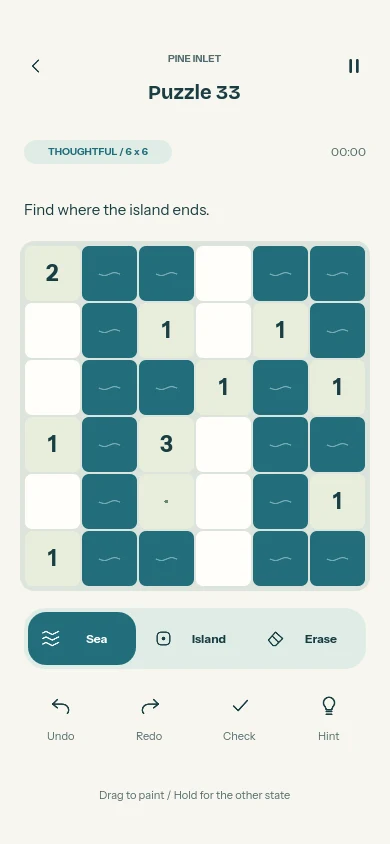
Islet puzzle 33: a six-by-six Nurikabe board with numbered islands, teal sea cells and Sea, Island and Erase controls.
Islet app icon: pale numbered island tiles and small waves on a teal sea.

What is Islet?

Islet is a Nurikabe game with a quiet coastal setting. Every number grows an island of exactly that many cells, including the clue. The remaining cells form one connected sea, with no solid two-by-two pools of water.

Work through 50 original campaign puzzles across Pebble Bay, Pine Inlet and Moonwater, from 4×4 to 6×6 boards. A rotating collection of 365 daily boards lives on the device, with a calendar for past dates. Islet works offline, includes every collection and has no purchases or lives.

See it in action

Tap any picture to enlarge it. Each one is labelled as a real screenshot, a preview render or a promotional illustration.

How to play

  1. Match each number

    Give every island exactly as many cells as its clue, including the numbered cell. Each island contains one clue.

  2. Keep islands apart

    Islands cannot share an edge. Diagonal contact is allowed.

  3. Connect the sea

    All sea cells must connect along their edges to form one continuous sea.

  4. Avoid square pools

    No 2×2 block may be entirely sea. Mark every unknown cell to complete the puzzle.

What is inside

  • Three coastal chapters50 campaign boards across Pebble Bay, Pine Inlet and Moonwater. All three collections are included.
  • Daily puzzles without a server365 bundled boards selected by date, with access to past dates. This is a rotating local catalog, not a live puzzle service.
  • Learn, check and ask for a hintTwo interactive lessons teach the rules. Check highlights visible rule conflicts; hints explain deductions or explicitly offer a guided reveal for more complex positions.
  • Mark at your own paceChoose Sea, Island or Erase, then tap or drag. Hold a cell for the opposite state. Undo and redo include whole strokes, and the timer is optional.
  • Pick your coastLight, night and system themes, optional cell markers, reduced motion, sound and haptics settings.
  • Save and returnPuzzles, undo history and preferences save locally. Export a backup file and restore it manually; there is no account or automatic cloud sync.

Privacy and support

Read exactly what Islet stores and which services it uses, or find out how to get help.

Guides from the studio

All articles

More from the orbit