Puzzle guides
Cubloom beginner's guide: blocks, pictures and your first garden
Learn Cubloom's Classic line clears, color-matched Picture Puzzles and garden growth, with practical tips for planning your first pieces.
4 min read
Read the guidePlace blocks. Finish pictures. Grow a garden.
Fit colorful blocks, reveal little pixel pictures and grow a voxel garden, one puzzle at a time.
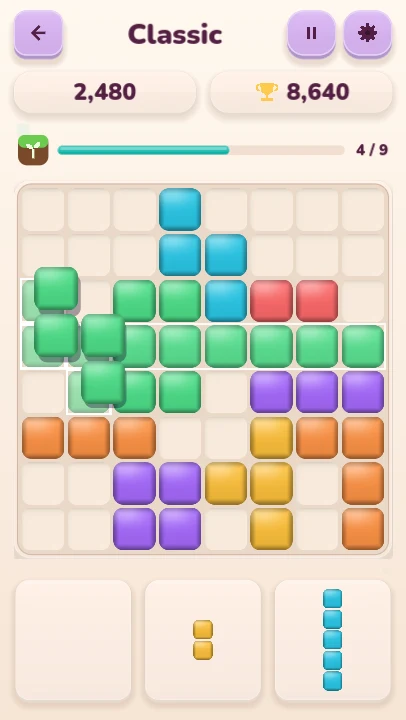

Cubloom brings three small pleasures together: fitting blocks, finishing pictures and growing a garden. In Classic, arrange pieces on an 8×8 board and clear full rows and columns. In Picture Puzzles, match colored pieces to the picture and reveal the finished artwork.
Explore 33 original picture puzzles and a Daily Picture chosen on your device. Progress across the modes helps grow a collection of nine voxel plants. Your board and preferences save locally, ready for your next visit.
Tap any picture to enlarge it. Each one is labelled as a real screenshot, a preview render or a promotional illustration.
Screenshots captured from the desktop Godot build of Cubloom.
Drag a piece from the tray onto the board. Pieces keep their shape and do not rotate; the preview shows whether a placement fits.
Fill a row or column to clear it. Plan space for all three pieces in the tray and keep the board growing.
In Picture Puzzles, fit pieces onto matching colored cells. Use undo or a hint when you need a hand.
Classic line clears, completed pictures and the daily puzzle contribute growth toward your next garden plant.
Read exactly what Cubloom stores and which services it uses, or find out how to get help.
Puzzle guides
Learn Cubloom's Classic line clears, color-matched Picture Puzzles and garden growth, with practical tips for planning your first pieces.
4 min read
Read the guide WIGGLEWAYColor Escape
 WAYLOFind your way out.
 Color PourA little pour. A little joy.
 Cat LogicA little space for every cat.
 Dodge RushOne tap. Three lanes. Don't blink.
 Color GardenA little space for your imagination.
 Numbers & LettersFollow the dots, one stroke at a time.
 IsletA little island. A clearer mind.