Tracing guides
Arabic letter and number tracing in Numbers & Letters
Follow Arabic letter strokes and dots, choose Eastern Arabic digits, and use recorded Arabic voices in the Numbers & Letters Android tracing app.
4 min read
Read the guideFollow the dots, one stroke at a time.
A finger-tracing app for 0–9 and the alphabet, with human-recorded names in English, French and Arabic.
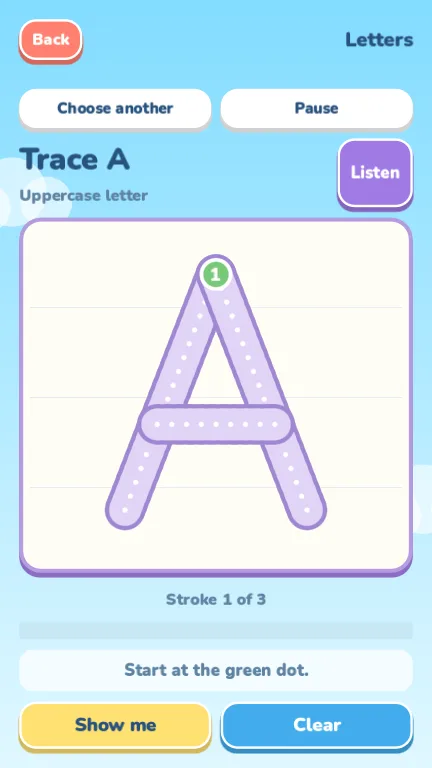
Numbers & Letters turns tracing into a small game. Pick a character, press the green dot and drag a finger along the dotted path, one stroke at a time, lifting between strokes.
Every character has its own ordered strokes. The app only counts a trace when every stroke is followed in order, so watching the demonstration never earns progress, and there is no timer or penalty for starting again.
A short trailer made from real tracing screens, recorded from the desktop build. Silent.
The video loads only when you press play, so it will not use your data until then.
Tap any picture to enlarge it. Each one is labelled as a real screenshot, a preview render or a promotional illustration.
Choose Numbers or Letters, then tap the one you want to practice.
Press the numbered green dot and follow the white dots along the path.
Characters with several strokes show where the next one begins.
Hear the character's name, watch a demonstration, or wipe the trace and try again.
Read exactly what Numbers & Letters stores and which services it uses, or find out how to get help.
Tracing guides
Follow Arabic letter strokes and dots, choose Eastern Arabic digits, and use recorded Arabic voices in the Numbers & Letters Android tracing app.
4 min read
Read the guideTracing guides
Explore letter and number tracing with ordered strokes, start dots and human voices in English, French and Arabic in the Numbers & Letters Android app.
4 min read
Read the guideStudio notes
Compare Islet, Cat Logic, Color Garden, Numbers & Letters and Dodge Rush by pace, controls and goals. Find the puzzle, creative activity or arcade run for you.
4 min read
Read the guide WIGGLEWAYColor Escape
 WAYLOFind your way out.
 CubloomPlace blocks. Finish pictures. Grow a garden.
 Color PourA little pour. A little joy.
 Cat LogicA little space for every cat.
 Dodge RushOne tap. Three lanes. Don't blink.
 Color GardenA little space for your imagination.
 IsletA little island. A clearer mind.