Arcade guides
Dodge Rush beginner guide: read the three-lane track
Learn Dodge Rush's left and right tap controls, how to plan lane changes around neon blocks, and what happens when you crash or reach the finish line.
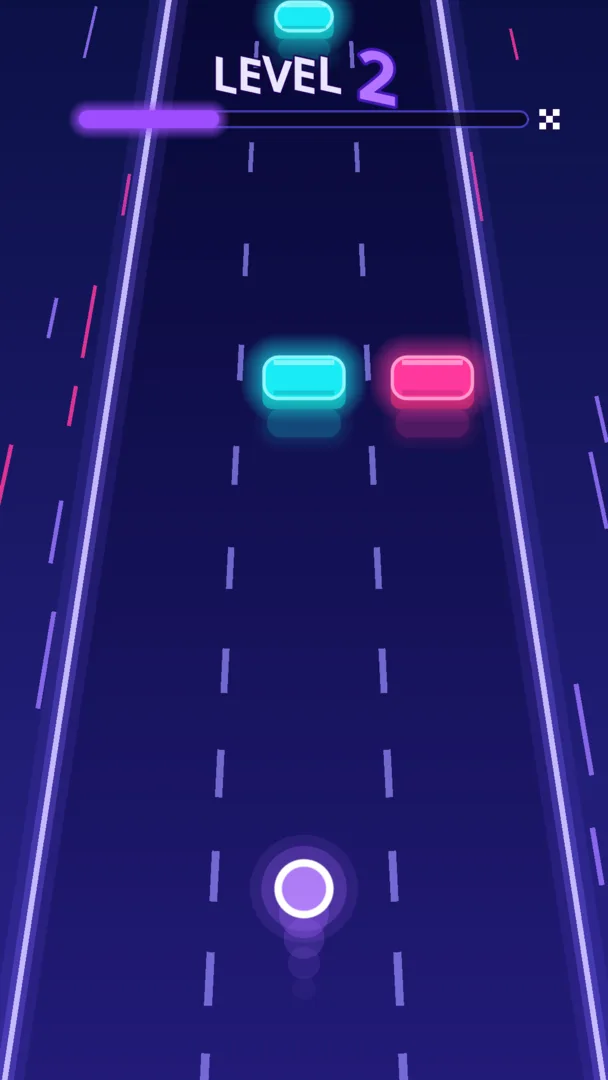
Dodge Rush puts a glowing ring on a three-lane track. The ring moves forward automatically. You tap left or right to change lanes, avoid blocks and reach the checkered finish line.
The controls are short enough to explain in a sentence, but choosing when to move takes practice. This guide walks through lane changes, reading the next opening and finding your rhythm on the track.
Each tap moves the ring one lane
Tap the left half of the screen to move one lane left. Tap the right half to move one lane right. There is no steering wheel or forward button: the level scrolls while you concentrate on the ring's lane.
Moving from one outside lane to the other requires passing through the center. Think about that intermediate lane before starting the move. A distant opening is only useful if you can reach it without colliding along the way.
Begin by connecting each tap to the ring's new position. Extra taps can take you past the lane you meant to use. Get comfortable making one deliberate change before trying to cross the whole track.
Look for the next opening, then the one after it
Cyan and pink blocks approach across the track. Both are obstacles. Look ahead of the ring and identify which lane will be open when the next block reaches you, rather than choosing a lane only because it is empty right now.
Once you have an opening, glance at the next group of blocks. A move that clears one obstacle can leave you poorly positioned for the following one. Try to choose a route through consecutive openings instead of reacting to every block in isolation.
There is no need to change lanes when your current route is already clear. Staying put for an opening can be a useful decision, especially if another move would put the ring beside an approaching obstacle.
Give each retry one thing to practice
One collision ends a run. After a crash, choose a specific question for the next attempt: did you move too late, add an extra tap, or choose a gap without checking the next block? A focused retry gives you something concrete to change.
You could use one run to practice single-lane movements and another to watch the center lane before crossing. Repeating the same hurried response makes it harder to see which part of a move needs attention.
- Know which lane the ring occupies before tapping.
- Choose an opening ahead of the ring.
- Check the route through the center before crossing two lanes.
- After a crash, change one part of your approach.
The goal is the finish line
Each level ends at a checkered line. Crossing it clears the level and unlocks the next one. This gives each run a defined destination, rather than asking you to survive an endless track indefinitely.
The current game has ten levels followed by further challenges as speed and obstacle density rise. Your highest unlocked level is stored on the device. As the patterns become denser, return to the same basics: controlled taps, an open route and enough attention for the next obstacle.
Know your retry and sound options
The crash screen offers Retry and Menu. Choose Retry for another attempt at the level, or Menu to take a break and adjust your sound or music settings.
Sound and Music have separate switches. Adjust them to suit where you are playing. The gameplay preview on the website is silent, while the game itself has sound effects and a looping synth track.
Your highest unlocked level is saved on the device. Focus on one finish line at a time, and use each retry to practice the lane change that caught you out.