Puzzle guides
Cubloom beginner's guide: blocks, pictures and your first garden
Learn Cubloom's Classic line clears, color-matched Picture Puzzles and garden growth, with practical tips for planning your first pieces.
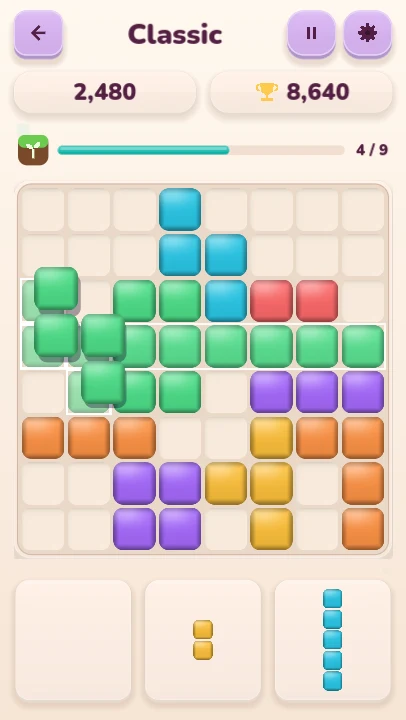
Cubloom connects block placement with two different goals: making room on a Classic board and completing a colorful pixel picture. Both feed a little voxel garden that grows as you play.
Start by learning how pieces fit, then try each mode with its own goal in mind. This guide explains the rules, what to check before placing a piece and how your first plants unlock. Screenshots come from the desktop Godot build.
In Classic, fill a row or column to make room
Classic uses an 8×8 board and a tray of three pieces. Drag a piece onto empty cells; every cell of the shape must fit inside the board. Pieces do not rotate, so check their orientation before planning a space for them.
A full row or column clears after placement. If a piece completes a row and a column together, both clear in the same move. The tray refills only after you have placed all three pieces.
The run ends when none of the remaining tray pieces fits anywhere. One awkward piece does not end the run while another still fits: a line clear from that other piece may open the space you need.
Look at all three pieces before placing the first
Before dragging, find a possible home for each piece. Start your planning with the shape that has the fewest options, such as a large square or a long line. You may choose to place another piece first if it clears space for that shape.
For example, if a horizontal line is your only way to finish a nearly full row, avoid putting a small block in that line's planned space. Place the line, let the row clear and inspect the remaining pieces again.
Keep some connected empty areas available. Scattered single-cell gaps can look roomy while leaving nowhere for larger shapes. Line clears, combos and perfect clears contribute to scoring, but keeping the tray playable is a useful first priority while you learn.
In Picture Puzzles, match the shape and the color
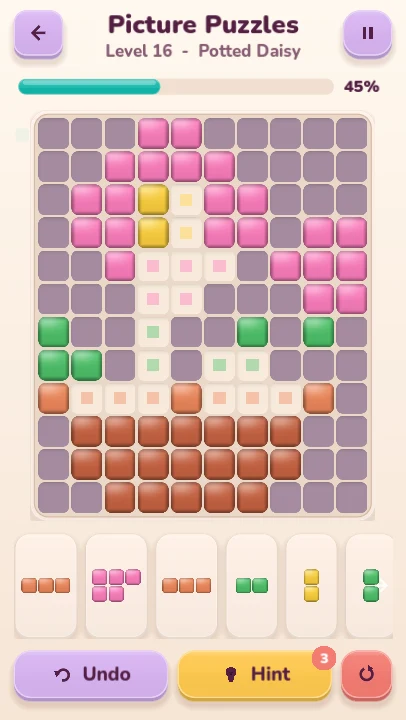
Picture Puzzles have a different goal: fill the missing parts of an image. A piece must cover unfilled cells of the same color. A shape that fits geometrically can still be wrong if one of its cells lands on a different color.
Look for distinctive corners, narrow gaps and small groups of one color. Compare those gaps with the available pieces before filling a large open patch, where several shapes may initially appear to fit.
Use undo when a placement leaves an awkward gap. Hints work from the current board; if the current arrangement cannot be completed, the hint system can tell you that undo is needed without charging a hint. There are 33 original pictures to explore.
Turn puzzle progress into your first plant
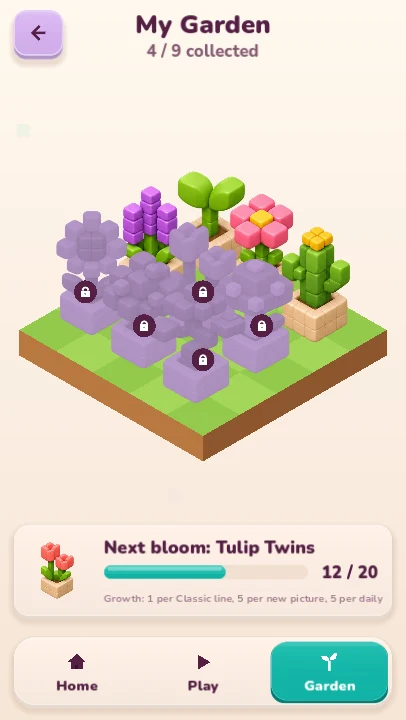
Garden growth comes from play across the modes. Each Classic line cleared gives one growth point. A picture's first completion gives five, and completing the Daily Picture gives five once for that date. A new plant unlocks every 20 growth points, in order.
For example, two first-time picture completions give ten growth points. Ten Classic line clears would supply the other ten toward a 20-point plant milestone. Repeating an already completed picture does not earn the first-completion growth again.
There are nine voxel plants to collect. Choose the mode you feel like playing and check the garden to see the next plant's progress; you do not need to stay in one mode to keep growing.
Return for a daily picture and make play comfortable
The Daily Picture is selected locally using your device's date. Its garden reward is available once per date, so repeating the same day's picture does not keep adding growth.
Settings offers Glossy Cubes, Soft Knit and Toy Bricks themes, high contrast, reduced motion and sound, music and vibration controls. Try high contrast if distinguishing picture colors is difficult.
Your boards, progress and preferences save locally without an account. Clearing app data removes those records; the garden is part of the local save rather than a separate cloud collection.