Puzzle guides
Color Pour beginner's guide: make room for your next move
Learn Color Pour's pouring rules, how to use empty bottles and plan around top colors, and when undo or restart can help untangle a puzzle.
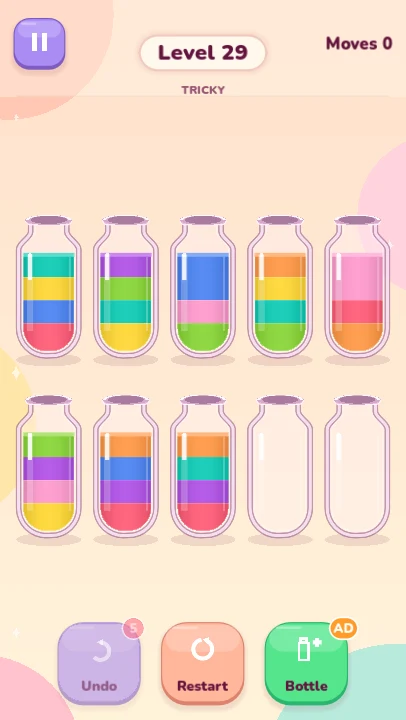
Color Pour asks you to turn mixed layers into bottles of one color. A legal pour can feel obvious, but the useful question is what that pour lets you do next: does it uncover a needed color, combine matching layers or free a bottle?
This guide covers the pouring rules and a few planning habits for the 60-level collection. These are ways to inspect a board, rather than one fixed move order for every puzzle. Screenshots show the desktop Godot build.
Check the top color and the space above it
Tap a non-empty bottle to select it, then tap the destination. A pour is allowed when the destination has space and is either empty or has the same color on top. Tap the selected bottle again to deselect it.
Each bottle holds four units. The pour moves as much of the connected top-color group as will fit; you do not choose an arbitrary number of layers. If two blue units sit together at the top and the destination has room for both, both move in that pour.
The goal is for every non-empty bottle to be full and contain just one color. Empty bottles are allowed at the finish. A partly filled bottle of one color may be useful along the way, but it is not yet a completed bottle.
Treat an empty bottle as temporary working space
An empty bottle accepts any top color, which makes it valuable for uncovering a layer that is buried elsewhere. Before using one, check what the move exposes in the source bottle and where the transferred color could go afterward.
Suppose a bottle has one blue unit above three red units. Moving the blue into an empty bottle exposes the red group. That can be useful if another bottle has room for red, or if the blue can later join other blue units and free the temporary bottle again.
Try to preserve or recover an empty bottle where the board allows it. Filling every spare bottle with a different color can reduce your options. An empty bottle is a planning tool, though, so use it when the move creates a clear next step.
Look for the move after the move
Start by comparing visible top colors. Combining matching layers can consolidate a color and uncover another one underneath. Check the destination's remaining capacity before assuming the whole group will move.
A useful short plan is: move the top layer, expose the next color, then move that color onto a matching bottle. If you cannot name a follow-up, inspect another pair before committing.
Avoid shuffling a color back and forth without changing access to the layers below it. A pour that empties a source bottle or exposes a useful match often gives you more to work with than a pour that merely relocates the same obstruction.
- Which color becomes available after this pour?
- Will the destination have room for the whole top group?
- Can this move empty a bottle or help finish one color?
- Where can the transferred color go next?
Use undo when your plan loses its next step
Each attempt starts with five free undos. Undo restores the previous board and move count, so use it to revisit a pour that filled your last useful space or exposed a color with nowhere to go.
Restart asks for confirmation before discarding the attempt's moves. It is useful when you want to approach the same starting layout with a different plan. First look at the current board and identify the move you would change, so the next attempt has a direction.
Optional rewarded help for five more undos or one extra empty bottle per attempt is part of the planned ad-supported release. The extra bottle provides more working space; the normal color and capacity rules still apply.
Practice the routine, then try the daily challenge
The first campaign level introduces pouring, followed by puzzles that grow to twelve colors. As boards get busier, keep using the same checks: top color, capacity, exposed layer and next destination.
The daily challenge uses a separate pool of 40 bundled puzzles selected by your device's date. It gives you another layout to practice without needing a live puzzle service.
Progress, the unfinished board and its undo history save locally. Return to a puzzle later if you want a fresh look, and use Settings to choose sound, music and vibration preferences.