Puzzle guides
WIGGLEWAY beginner's guide: make room for a color escape
Learn how to drag either end of a wiggler, make space on crowded boards and reach matching rings in WIGGLEWAY's relaxed, timed and daily puzzles.
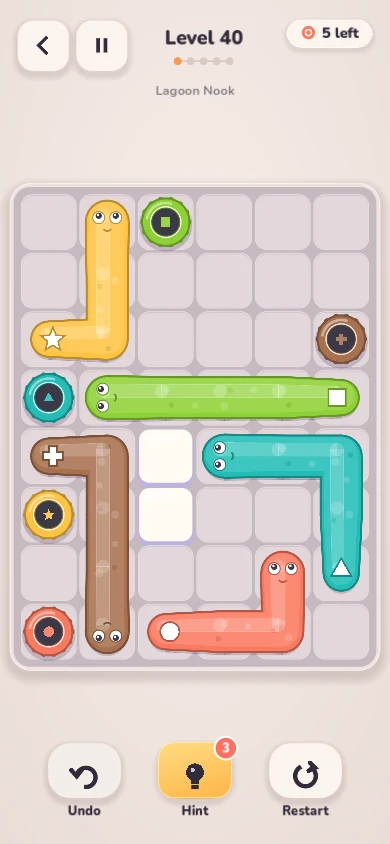
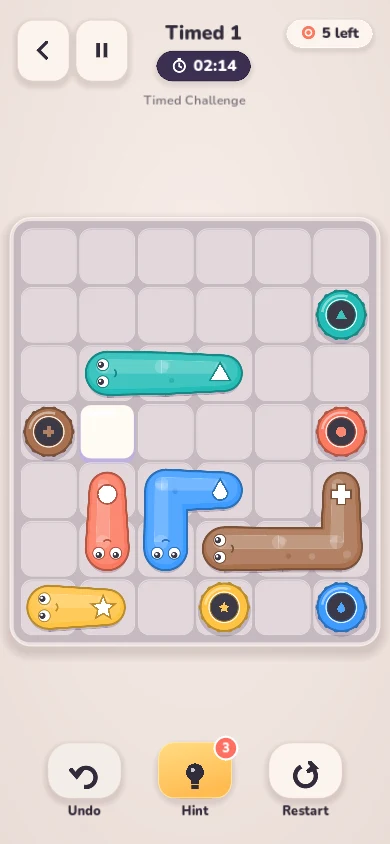
WIGGLEWAY's creatures are flexible, but the space around them is limited. Each wiggler needs to reach its own ring while its whole body follows through the board. A useful move may be a small repositioning that opens a corridor for someone else.
This guide explains movement, matching exits and a way to inspect a crowded board before dragging. Start in the Relaxed Campaign to learn without a countdown. The screenshots show the current desktop Godot build.
Drag the face or the tail, one cell at a time
A wiggler is a chain of neighboring cells. Its face marks the head and a symbol marks the tail. Drag either end into an open neighboring cell: the body follows toward that end while the opposite end leaves its previous cell. The length stays the same.
Movement is horizontal or vertical. A creature cannot jump over another body, cross a wall, leave the board or stretch across a gap. A quick flick still checks the cells along the way and stops at the first obstruction; it does not find a route around it automatically.
If the head has no useful space, inspect the tail. Pulling from the other end can change the creature's position and free a cell that the head could not reach directly. Release when the position looks useful; you do not need to reach an exit in one drag.
Match both the color and the symbol
Every wiggler has its own exit ring, marked with the same color and symbol. Guide either endpoint into that matching ring to commit an escape. A ring belonging to another creature is an obstacle, not a spare square you can pass through.
Once a creature enters its ring, it leaves the board and its occupied cells become available. Wait for the escape animation to finish before moving the next wiggler. The level is complete when every creature has escaped.
Keep symbols enabled if nearby colors are hard to distinguish. Settings also offers high contrast. Use the identity of the ring, rather than simply aiming for whichever exit is closest.
Plan which cells need to become empty
Choose one creature and inspect a possible route from an endpoint to its ring. Note the first occupied cell on that route, then look at the creature occupying it. Can that neighbor move into an open pocket, even without escaping yet?
For example, suppose a green wiggler blocks a narrow passage needed by a coral one. Moving green a few cells away from the passage may let coral reach its ring. Coral's escape then frees enough space to bring green back toward its own exit.
Treat this as a question to test, rather than a rule that the nearest creature should always leave first. Unlike a simple arrow release, a repositioning can occupy cells that another creature needs. Check both the space you free and the space your moving body will occupy.
- Find the matching ring before moving.
- Inspect both endpoints for a usable route.
- Identify the first creature or wall blocking that route.
- Look for a temporary pocket that opens the required cells.
Use free undo to revisit a whole drag
During a drag, pointing back along the route retraces your recent steps. After releasing, Undo returns the whole drag as one action, including an escape it caused. You do not need to undo each cell separately.
Undo and Restart are free. If a move closes a useful corridor, undo it and compare a different endpoint or temporary position. Wrong moves do not cost a life.
Hints search from the current position. A credit is spent only when a move is shown; a search that reaches its limit without finding a move is not proof that the board is impossible. Start with three hint credits. Optional rewarded hints are part of the planned ad-supported release.
Learn relaxed, then try a different pace
The Relaxed Campaign has 100 levels, including five tutorials, with no timer or lives. Use it to practice how a body follows an endpoint and how to clear shared corridors.
Timed Challenge has 12 boards with countdowns. If time runs out, retry for free. A one-time rewarded extension of 30 seconds per timed attempt is part of the planned release. Keep the same movement checks under the clock: faster swipes still cannot cross an obstacle.
The Daily Puzzle is selected using your device's date from a separate pool of 36 bundled boards. Campaign and timed progress, daily history, unfinished sessions and settings save locally without an account. You can return to the relaxed mode whenever you want more room to think.