Puzzle guides
How to play WAYLO: find your first clear path
Learn how WAYLO's arrowheads, blockers and escape paths work, then build a simple routine for clearing boards with free undo and helpful hints.
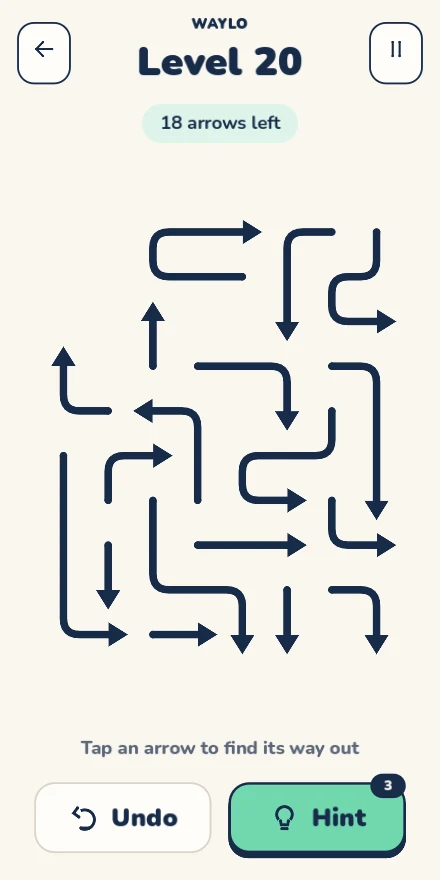
A WAYLO board looks like a tangle of bent lines, but each move starts with one small question: can this arrow's head reach the edge without meeting another arrow? Find a clear exit, tap the arrow and watch the board open up.
There is no timer or lives system. This guide walks through the rules and a scanning routine you can use from the first tutorial to larger boards. The screenshots show the desktop Godot build.
Read the head before following the bends
Each arrow is a continuous path with a tail and an arrowhead. Its head determines its exit direction. An arrow pointing right needs a clear straight line from its head to the right edge, even if the rest of its body bends up, down or back across the board.
Trace that straight line with your eyes. Another arrow's body can block the exit just as its head can. The selected arrow's own cells do not count as blockers. You do not drag or rotate the arrow into position: tap it to try the release.
For example, a right-facing arrow can leave if no other arrow occupies the cells between its head and the right edge. A different arrow below that line does not block it, even if the two shapes look close together.
Start with a head that has a short path to the edge
Heads near an edge are a useful place to begin because there are fewer cells to inspect. Check those pointing outward, then scan the other heads in the same direction. Near the edge does not automatically mean free; always check the line ahead.
After an arrow leaves, look at the space it occupied. Several other arrows may now have a clear exit. Follow those changes before scanning the entire board again.
A legal removal only takes occupied cells away. It cannot add a new blocker, so you do not need to worry that releasing a free arrow will ruin a solvable board. When several arrows can leave, choose one and keep looking for the next opening.
Use a blocked tap as a clue
If an arrow cannot leave, the board stays unchanged. WAYLO highlights the first blocking arrow and draws a dashed line toward it. Follow that feedback to understand which shape is in the way.
Inspect the blocker's head next. If it is also blocked, keep following the chain until you find an arrow with an exit, or switch to another part of the board. Repeatedly tapping the same blocked shape does not move it closer to the edge.
Use undo to revisit a move and hints to find an opening
Undo is free and unlimited. It returns the most recently removed arrow, which is useful when you want to study how that move opened another path. You do not need undo to avoid a bad legal removal: removing an arrow cannot create a new obstruction.
A hint highlights an arrow that can leave in the current position; it does not remove it for you. Before tapping the highlighted arrow, trace its exit line and check why it is free. That gives you a pattern to look for on the next board.
You begin with three hint credits. Optional rewarded ads for more credits are part of the planned ad-supported release. Ordinary puzzle completion does not require watching an ad.
Keep the same routine as boards grow
On a larger board, pan and pinch to zoom when heads or bends become hard to follow. Reset the view to see the whole layout again. Zoom changes the view; the escape rules stay the same.
Use a steady loop: read a head, inspect the straight exit, release a free arrow, then check the space it opened. The campaign has 100 levels, including five tutorials. A separate pool of 40 local daily puzzles gives you another board selected by your device's date.
Campaign progress, unfinished boards and preferences save on the device. You can take a break and return, or choose the dark theme and reduced motion in Settings for a more comfortable view.